


Home > Guide > Top Spotify to MP3 Downloader
Top 10 Free Spotify to MP3 Downloaders (2026 Latest)

Spotify does not offer any options to download songs as MP3 local files, which means your playlists, liked songs, albums, and audiobooks can't be saved, moved, or played outside Spotify. If you want to download Spotify to MP3 and turn Spotify music into local files that work offline and on any device, Spotify downloader is needed.
This guide covers the 10 best free Spotify to MP3 downloaders that actually work in 2026. The tools are compared across key factors like compatibility, batch download support, audio quality, and output formats, making it easy to pick the right option.
📑 Table of Contents
Part 1. Can You Download Spotify to MP3?
No. You cannot download songs from Spotify to MP3. Spotify offers an offline download feature that lets users download music and listen without an internet connection, but only within the Spotify app. These downloads are not actual audio files you can access or export. Even with Spotify Premium, you cannot transfer downloaded songs to a USB drive, iPod, or other music players.
| Spotify Free | Spotify Premium | |
| Download music offline | ❌ | ✅ Download songs, albums, playlists offline |
| Download podcast offline | ✅ Supported | ✅ Supported |
| Where playable | Only within Spotify app | Only within Spotify app |
| File format | Encrypted files | Encrypted files |
| After canceling Premium | ❌ | ❌ Offline downloads stop working |
| Export as MP3 | ❌ | ❌ |
| Export to USB / iPod / car | ❌ | ❌ |
Part 2: Best Desktop Spotify to MP3 Downloaders (Windows & macOS)
1. NoteCable Spotify Downloader
NoteCable Spotify Downloader is a safe and stable desktop tool for users who want to download Spotify content for offline and permanent use. It supports batch download of Spotify playlists, Liked Songs, albums, and podcasts to MP3, FLAC, WAV, AIFF, AAC, ALAC. NoteCable allows Spotify lossless download up to 320 kbps. You can batch and stably convert Spotify content to local files for offline access, long-term storage, transfer, and playback on other devices such as iPod, USB drive, and other players.
| Link | Device | Output Format | 320kbps Quality | Lossless | Batch Download | ZIP Support | Ads | Install | Reliability | Rating |
|---|---|---|---|---|---|---|---|---|---|---|
| NoteCable Spotify Downloader | Windows · macOS | MP3 · AAC · WAV · FLAC · AIFF · ALAC | ✅ Supported | ✅ | ✅ | ❌ | No ads | Desktop required | High stability | ★★★★★ |
NoteCable Spotify Downloader
Download Spotify music faster, keep full quality, and enjoy offline playback anytime.
 How to Use NoteCable Spotify Downloader?
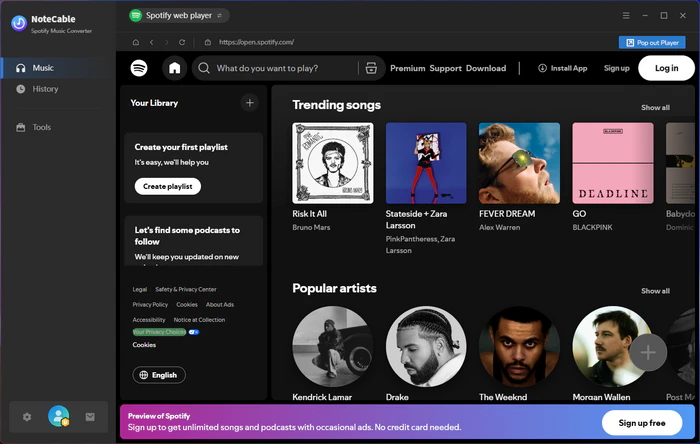
Step 1 Install NoteCable Spotify Downloader and open the program on your computer. When you launch NoteCable, a Spotify Web Player window will pop up automatically for you to log in and start downloading music.
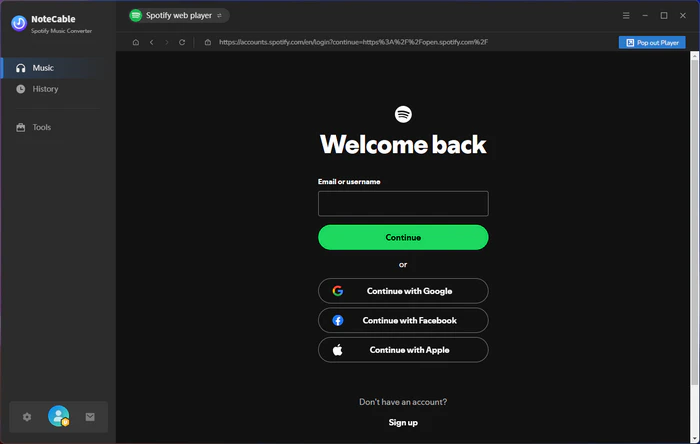
Step 2 Log in to your Spotify account through the Spotify web player inside NoteCable.
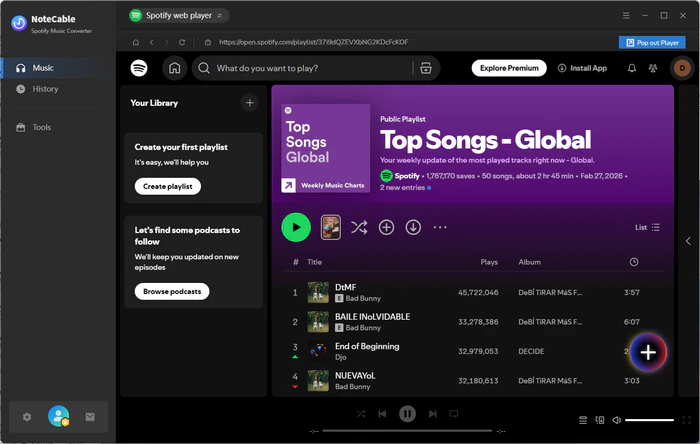
Step 3 Open your Liked Songs, or search for the playlists and songs you want to download, then click the "+" button.
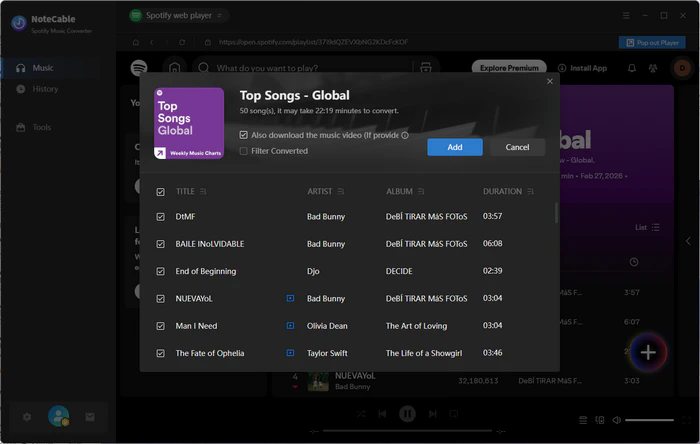
Step 4 NoteCable will load the content. Select the songs you want to download — it supports one-click batch download and also supports downloading music videos. After selecting, click Add.
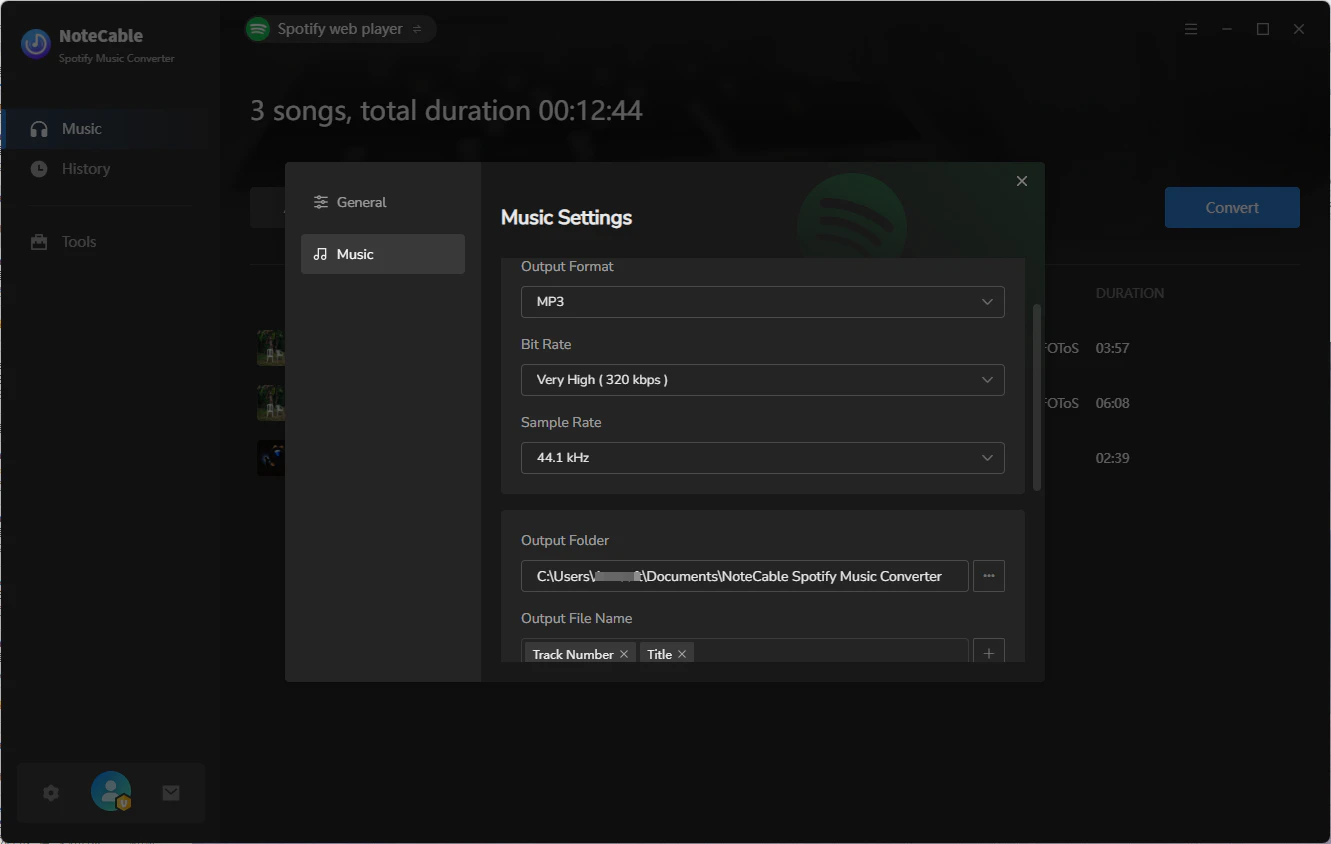
Step 5 Open Settings, choose the output format (MP3, FLAC, WAV, M4A, ALAC, AAC), select the bitrate (up to 320 kbps), then start Convert.
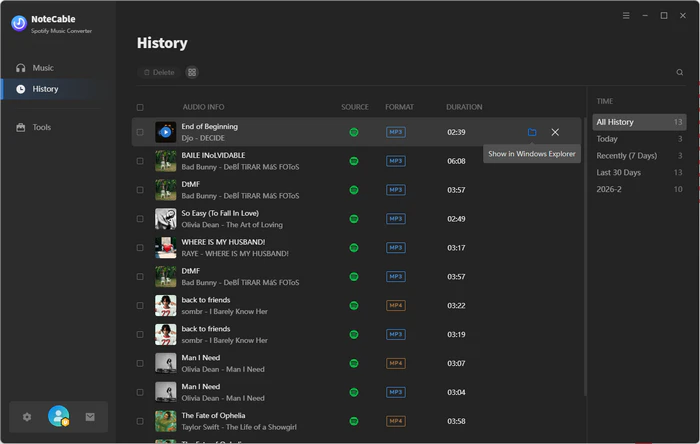
Step 6 After the conversion finishes, open History to find the downloaded Spotify MP3 files saved locally.
2. Soggfy
Soggy is a free and open-source Spotify downloader for Windows that works inside the Spotify desktop app. It allows to download Spotify tracks, albums and playlists while keeping metadata and artwork. Soggy helps to download Spotify to MP3 or OGG with stable music quality. But it does not support batch download, so users cannot download an entire playlist with one click and each song must be downloaded individually during playback.
| Link | Device | Output Format | 320kbps Quality | Lossless | Batch Download | ZIP Support | Ads | Install | Reliability | Rating |
|---|---|---|---|---|---|---|---|---|---|---|
| Soggfy | Windows | MP3 · OGG | ✅ for premium | ✅ | ❌ | ❌ | No ads | Desktop required | Medium | ★★★☆☆ |
|
✅Pros:
❌Cons:
|
||||||||||
How to Install and Use Soggfy?
Step 1 Download the Soggfy ZIP from GitHub, extract it, and run Install.cmd. Allow the installation and install FFmpeg when prompted.
Step 2 Close and reopen Spotify desktop. Open the Soggfy settings icon and confirm your download folder.
Step 3 Open the playlist or album you want and play songs normally. Soggfy will detect and download tracks after they finish playing.
Step 4 Go to your Music folder → Soggfy. Files are organized by artist with metadata and album artwork included.
Step 5 Connect your phone via USB, then copy songs from the Soggfy folder into your phone.
Part 3: Best Online Spotify Downloaders
3. Spotisaver
Spotisaver is a free and web-based Spotify downloader that lets you download individual tracks, albums or playlists to the local device. It supports batch download so users can convert the whole Spotify playlist or album as a ZIP. The output is mainly MP3 and keeps basic metadata such as artist, album, release date, and cover art, so the process is simple and no installation is required. However, it does not support Spotify shows or podcasts or Spotify music videos. The free version is limited to download up to 100 songs into a ZIP.
| Link | Device | Output Format | 320kbps Quality | Lossless | Batch Download | ZIP Support | Ads | Install | Reliability | Rating |
|---|---|---|---|---|---|---|---|---|---|---|
| Spotisaver | All | MP3 | ✅ Claimed | ❌ | ✅ | ✅ | No ads | No install | MediumDomain change | ★★★★☆ |
|
✅Pros:
❌Cons:
|
||||||||||
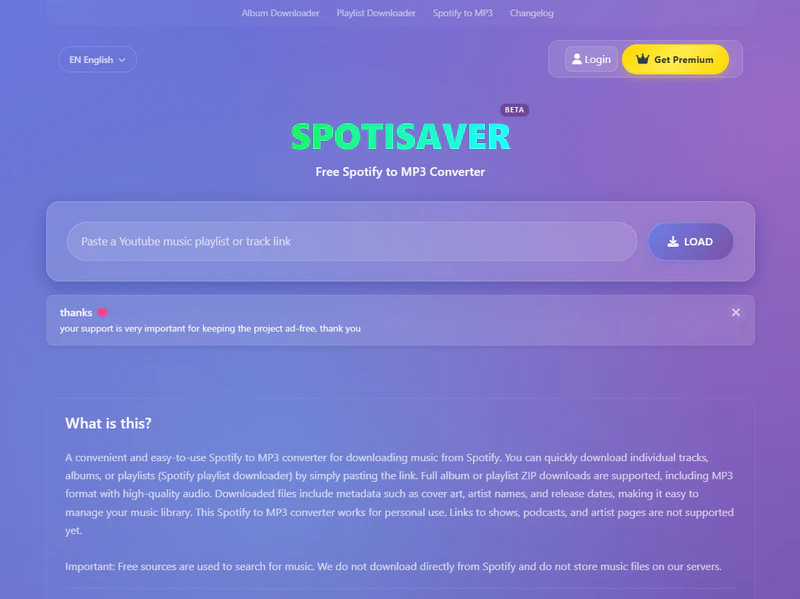
How to Use Spotisaver?
Step 1 Open Spotify and log into your account. Then copy the link of the song, album, or playlist you want to download.
Step 2 Go to the Spotisaver website in your browser and paste the Spotify link into the input box.
Step 3 Click the Load button and wait for the tool to process the link.
Step 4 When the track list appears, choose individual songs or select Download Playlist / Download ZIP to download all tracks.
Step 5 The MP3 files (or ZIP file) will be saved to the default download folder in your device.
4. Spotidownloader
Spotidownloader is a web-based tool that allows users to download Spotify songs, albums, and playlists as MP3 files with audio quality up to 128 kbps. It offers a simple, beginner-friendly workflow and supports batch downloading playlists into ZIP files (around 100 tracks per ZIP). The main advantages are its ease of use and no installation requirement, while the downsides include ads, redirects, and pop-ups, as well as inconsistent results such as missing tracks, wrong matches, or blank files since it typically records or matches audio from YouTube rather than downloading directly from Spotify.
| Link | Device | Output Format | 320kbps Quality | Lossless | Batch Download | ZIP Support | Ads | Install | Reliability | Rating |
|---|---|---|---|---|---|---|---|---|---|---|
| Spotidownloader | All | MP3 | ❌ | ❌ | ✅ | ✅ | ⚠️Redirects | No install | Mediummissing tracks · incorrect matches | ★★★☆☆ |
|
✅Pros:
❌Cons:
|
||||||||||
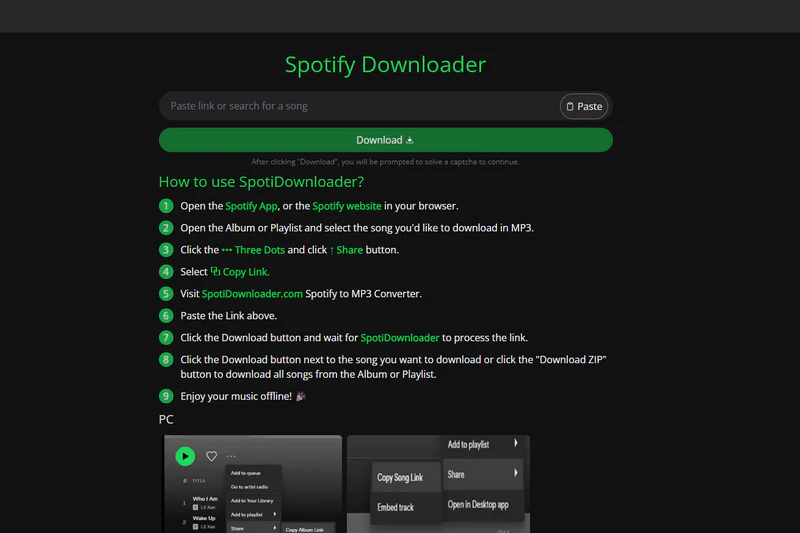
How to Use Spotidownloader?
Step 1 Open Spotify App or website on your device. Remember to log into your Spotify account.
Step 2 Open songs, albums, or playlists you want to download in MP3.
Step 3 Click the Three Dots and Share button to copy the link of songs.
Step 4 Visit spotidownloader.com and paste the link into the input filed.
Step 5 Click the download button and SpotiDownloader will process the link and display the search results.
Step 6 Click the Download button next to a specific song, or choose Download ZIP to download all songs from the album or playlist at once.
5. Spotmate
Spotmate is an online tool that converts Spotify songs, albums, and playlists into MP3 files for offline listening or transferring. It is easy to use without installing any app; simply copy and paste the Spotify song link. It is convenient for users who want to quickly download Spotify to MP3. However, Spotmate does not support batch download for whole playlists, so you need to convert songs one by one. The download speed can be slow, making it not suitable for downloading large Spotify playlists.
| Link | Device | Output Format | 320kbps Quality | Lossless | Batch Download | ZIP Support | Ads | Install | Reliability | Rating |
|---|---|---|---|---|---|---|---|---|---|---|
| Spotmate | All | MP3 | ❌ | ❌ | ✅for premium | ✅ | No ads | No install | Inconsistent | ★★★★☆ |
|
✅Pros:
❌Cons:
|
||||||||||
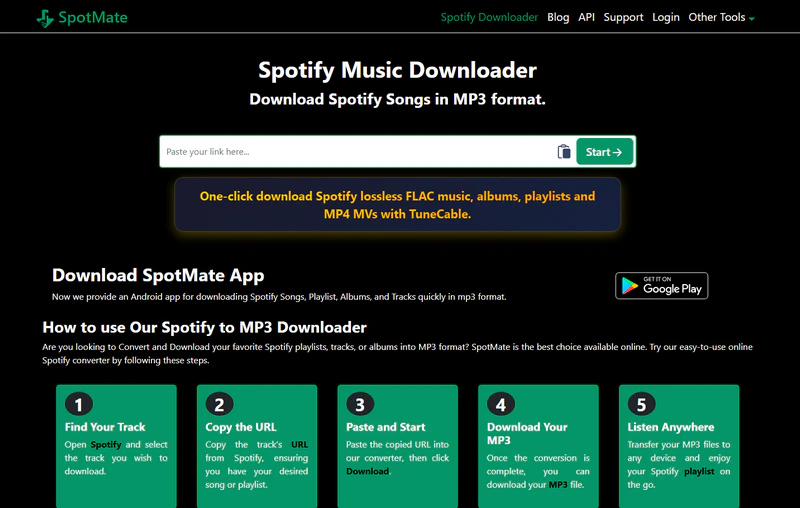
How to Use Spotmate?
Step 1 Open Spotify on your device and find the song/album/playlist you want to download.
Step 2 Copy the URL from Spotify.
Step 3 Paste the URL into the input field on Spotmate and click Start.
Step 4 Spotmate will process the link and list the tracks one by one.
Step 5 Click Convert next to a track to download it as an MP3 file.
6. MusicsHuntersbot
MusicsHuntersbot is a Telegram music bot that works on mobile, desktop, and web versions of Telegram. It allows users to search for songs or paste links from platforms like Spotify, Deezer, Tidal, Qobuz, and SoundCloud. The bot usually provides audio files in formats such as MP3 or FLAC, with typical audio quality ranging from 128kbps to 320kbps depending on the source. Batch download is not supported. Playlist songs are sentindividually rather than as a single ZIP file. Download speed may slow down for large playlists, and some tracks may be unavailable or matched incorrectly.
| Link | Device | Output Format | 320kbps Quality | Lossless | Batch Download | ZIP Support | Ads | Install | Reliability | Rating |
|---|---|---|---|---|---|---|---|---|---|---|
| MusicsHuntersbot | Mobile Desktop Web | MP3 · AAC · M4A · FLAC | ❌ | ❌ | ❌ | ❌ | No ads | Depends | Inconsistent | ★★★☆☆ |
|
✅Pros:
❌Cons:
|
||||||||||
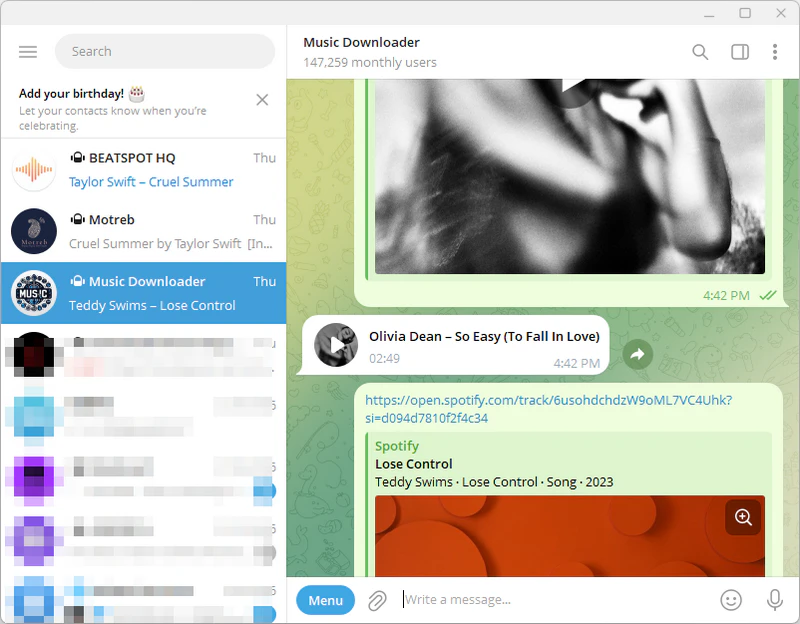
How to Use MusicsHuntersbot?
Step 1 Open Telegram and search @MusicsHuntersbot, then tap Start.
Step 2 Send a song name, artist, or paste a Spotify playlist link to the bot.
Step 3 Choose the correct track from the results returned by the bot.
Step 4 Tap the audio file to play and then download it in Telegram.
Step 5 Save the file to your device (Save to Files / Save to Downloads)
7. Motreeb
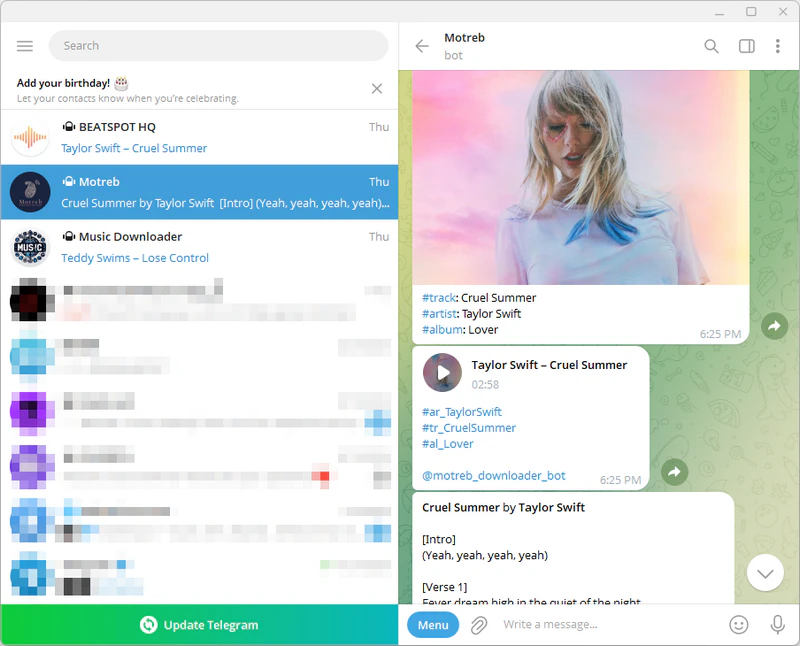
Motreeb is a Telegram-based Spotify downloader bot that works on mobile, desktop, and web versions of Telegram. Users can paste a Spotify song or playlist link to get an audio file directly in Telegram, usually in MP3 format with quality up to 320kbps. It focuses on simple Spotify to MP3 conversion and may display basic track info such as metadata and lyrics. Batch download is not supported, so playlist songs are typically delivered one by one, and performance may slow down with large playlists.
| Link | Device | Output Format | 320kbps Quality | Lossless | Batch Download | ZIP Support | Ads | Install | Reliability | Rating |
|---|---|---|---|---|---|---|---|---|---|---|
| Motreeb | Mobile Desktop Web | MP3 · M4A | ❌ | ✅ | ❌ | ❌ | No ads | Depends | Inconsistent | ★★★☆☆ |
|
✅Pros:
❌Cons:
|
||||||||||
How to Use Motreeb?
Step 1 Open Telegram and search @motreb_downloader_bot, then tap Start.
Step 2 Paste a Spotify song or playlist link, or send a song name.
Step 3 The bot fetches track information and may display lyrics and metadata.
Step 4 Tap the audio file to download it and save it to your device.
8. SpotDown
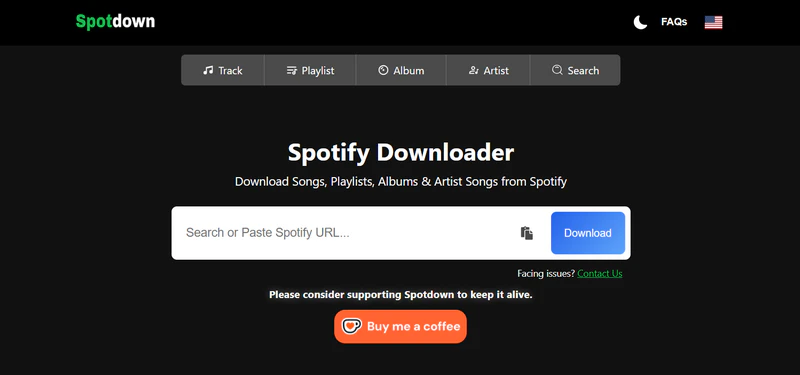
SpotDown is a web-based Spotify downloader that helps to save Spotify songs, playlists, albums and artists to MP3 on local devices. It works across mobile phones, tablets, and desktops without requiring a Spotify login. SpotDown offers a simple way to batch download Spotify playlists. However, the website contains ads and redirects, and download reliability may vary, with occasional failures.
| Link | Device | Output Format | 320kbps Quality | Lossless | Batch Download | ZIP Support | Ads | Install | Reliability | Rating |
|---|---|---|---|---|---|---|---|---|---|---|
| SpotDown | All | MP3 | ✅ | ✅ | ✅ | ❌ | Few ads | No install | Stable | ★★★★☆ |
|
✅Pros:
❌Cons:
|
||||||||||
How to Use SpotDown?
Step 1 Copy the Spotify song, playlist, album, or artist link.
Step 2 Go to https://spotdown.org/ and paste the link into the search box.
Step 3 The bot fetches track information and may display lyrics and metadata.
Step 4 Click Download and save the MP3 file to your device.
9. Spotdl
Spotdl is a web-based Spotify downloader that allows users to convert Spotify songs, playlists, albums, and artists into audio files for offline listening. It works directly in the browser, so no installation or account is required. The platform mainly outputs MP3 files, supports batch downloads for playlists, and is designed to work across mobile and desktop devices for quick and simple use. It also provides an optional Premium plan with extra features, including bulk playlists, auto MP3 conversions, and zero ads or pop-ups.
| Link | Device | Output Format | 320kbps Quality | Lossless | Batch Download | ZIP Support | Ads | Install | Reliability | Rating |
|---|---|---|---|---|---|---|---|---|---|---|
| Spotdl | All | MP3 | ❌ | ❌ | ✅ | ✅ | No ads | No install | Unstable | ★★★☆☆ |
|
✅Pros:
❌Cons:
|
||||||||||
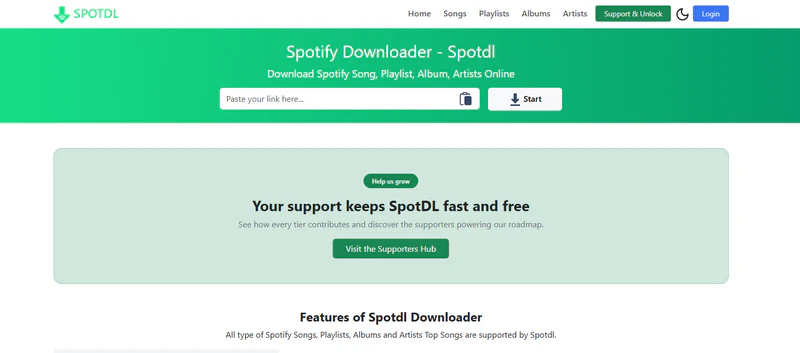
Step 1 Search for Spotify songs, albums or playlist and copy the link of Spotify content.
Step 2 Go to Spotdl.io and paste the link into a specific place. Then click the start button.
Step 3 Spotdl.io will display the result and you need to click the convert button to convert the song to mp3.
Step 4 Wait for the preparation process to finish, then click Download to save the MP3 file to your device.
Part 4: Best Spotify to MP3 Downloader for Android
4.1 Sidify Spotify Downloader APK
Sidify Spotify Downloader APK is a dedicated Spotify downloader for Android users who want to save Spotify music to phones easily and reliably. It supports one-click batch downloads which help to download entire playlists directly to local devices without complicated steps or link copying. The app keeps high audio quality, including up to 320kbps and lossless options, and supports multiple formats such as MP3, WAV, and FLAC.
| Link | Device | Output Format | 320kbps Quality | Lossless | Batch Download | ZIP Support | Ads | Install | Reliability | Rating |
|---|---|---|---|---|---|---|---|---|---|---|
| Sidify Spotify Downloader APK | Android | MP3 · AAC · WAV · FLAC · AIFF · ALAC | ✅ | ✅ | ✅ | ❌ | No ads | Android install | Reliable | ★★★★★★ |
|
✅Pros:
❌Cons:
|
||||||||||
How to Use Sidify Spotify Downloader APK?
Step 1 Install Sidify Spotify Downloader APK on your Android device.
Step 2 Open Sidify, enter the built-in Spotify web player, and log in to your Spotify account.
Step 3 Search for a Spotify song, album, or playlist. Open it and tap the + button. Sidify will show all tracks in the list. Choose the songs you want, then start the download. Sidify will download them in batch.
Step 4 Set the output path, choose the output format such as Original for lossless or MP3, select audio quality from 128 to 320 kbps, and enable output organization.
Step 5 Open the history section to view and access your downloaded audio files.
Part 5: FAQs about Spotify to MP3 Downloaders
Q1. Can I have my downloaded songs if I leave Spotify?
A1. No. Spotify downloads are encrypted files that play only within Spotify. Spotify Premium lets you download songs for offline listening, but those downloads still work only in the Spotify. You are not allowed to keep these songs in the local devices or move them to other players or apps even if you have Spotify premium.
Q2. Can I directly download songs from Spotify to MP3?
A2. No. Spotify does not provide a way to download songs as MP3 files, as all music on the platform is stored in an encrypted format that can only be played within the Spotify app. If you want to convert Spotify music to MP3 for use on an MP3 player, iPod, or USB drive, you would need to use a Spotify downloader, and it should be used responsibly for personal use only.
Q3. Is a Spotify downloader safe to use?
A3. Spotify downloaders are third-party tools and are not provided by Spotify, so choosing a reliable one is important. Low-quality or sketchy sites can expose your device to excessive ads, redirects, or unwanted software. In general, while online downloaders operate as ad-supported sites that can be unreliable or filled with redirects, dedicated desktop Spotify downloaders tend to be more stable and reliable.👍 Download NoteCable Spotify to 320kbps MP3 Downloader for Free: No ads!

