


Home > Spotify Music Tips > Spotify Playlist Organizer
8 Tested Free Online Spotify Playlist Organizers [2026 Reviews]

Is your Spotify library overflowing with messy playlists and duplicate tracks? While Spotify's built-in sorting options are limited, several free web tools can automatically organize your Spotify songs by BPM, mood, genre, or energy in seconds.
In this 2026 guide, we review the 8 best free online Spotify playlist organizers. Plus, we introduce a powerful Spotify Playlist Converter to turn your newly organized Spotify playlists into offline audio files, giving you total control over your Spotify playlists anywhere, anytime.
- Comparison Table: Spotify Playlist Organizers vs. Spotify Playlist Converters
- 1. Skiley
- 2. Sort Your Music
- 3. Chosic
- 4. Organize Your Music
- 5. TuneMyMusic Playlist Organizer
- 6. Playlist Sorter
- 7. Sortlee
- 8. Emotionify
- Best Match: NoteCable Spotify Music Converter
- FAQs About Free Online Spotify Playlist Organizers
Comparison Table: Spotify Playlist Organizers vs. Spotify Playlist Converters
| # | Tool | Features | Playlist Backup | Best For |
|---|---|---|---|---|
| ⭐Best Match | NoteCable Spotify Music Converter | ✅ playlist, artist, album, release year, or other categories | ✅ | ✅ 6 output formats ✅ Download Spotify videos ✅ Keep Spotify lossless audio quality |
| 1 | Skiley | ✅ BPM, energy, danceability, key, popularity | ❌ | ✅ AI duplicate detection ✅ Stats dashboard |
| 2 | Sort Your Music | ✅ BPM, energy, mood, danceability | ❌ | ✅ Artist separation mode |
| 3 | Chosic | ✅ 20+ filters (genre, key, BPM, energy, etc.) | ❌ | ✅ Export playlist CSV |
| 4 | Organize Your Music | ✅ Mood, genre, decade, energy, popularity | ❌ | ✅ Visual music map ✅ Create playlists |
| 5 | TuneMyMusic | ❌ No track-level sorting, only bulk-managing feature | ❌ | ✅ Playlist transfer |
| 6 | Playlist Sorter | ❌ Basic sorting (artist, date, popularity) | ❌ | ❌ No advanced filters |
| 7 | Sortlee | ✅ 19+ options (BPM, key, mood, energy, metadata) | ❌ | ✅ Preview before saving |
| 8 | Emotionify | ✅ Mood, energy, valence, tempo, acousticness | ❌ | ✅ Emotional flow visualization |
❓ Want to download Spotify songs or playlists to MP3?
NoteCable Spotify Music Converter
Compatible with Windows & macOS · 100% Safe & Clean
1. Skiley
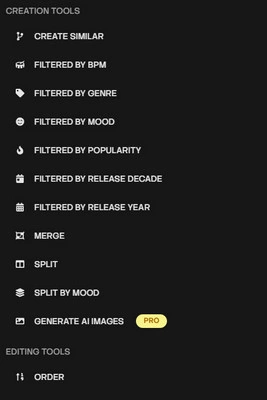
Skiley is an online, free (with a paid PRO tier) toolkit that connects to your Spotify account via OAuth and layers extra functionality on top of it.
| Website | www.skiley.net |
| ⭐Sort based on what⭐ | order tracks by name, artist, album, date added, popularity, BPM, key, energy, danceability, and more; works on playlists of any size. |
| Limits | Up to 5,000+ tracks; 3 actions per week for free users. |
| OS | Web/ Android/ iOS. |
| Special Feature: | 1. A stats dashboard; 2. AI-assisted dedup that catches near-duplicates like remasters, not just exact track-ID matches; 3. Auto-saves your Discover Weekly and Release Radar each week; |
 How to Use Skiley Spotify Playlist Organizer
Step 1 Visit skiley.net and select 'Connect Spotify'. You will be redirected to the official Spotify login page to authorize permissions. Once logged in, your saved playlists and Skiley's main navigation menu will automatically load on the screen.
Step 2 Choose the specific Spotify playlist you wish to modify.
Step 3 Set your preferred sorting filters, including options like genre, BPM range, energy level, or other specific audio traits.
Step 4 Save your changes. Skiley will automatically update and sync the newly organized playlist directly to your Spotify account.
2. Sort Your Music
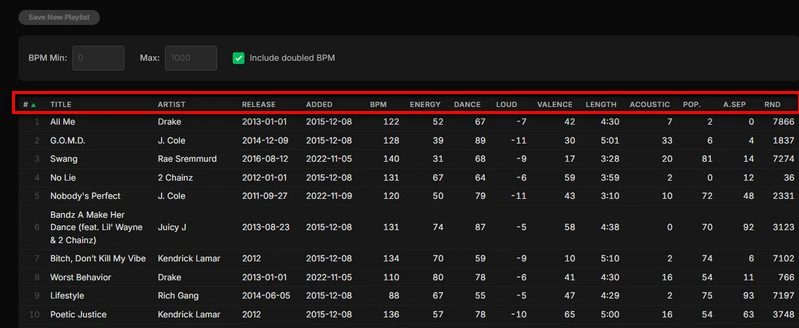
Sort Your Music is an online, free, no-frills Spotify playlist sorter. It leverages Spotify's detailed audio analysis data to give users fine-grained control over how their tracks are ordered.
| Website | https://sortyourmusic.playlistmachinery.com/ |
| ⭐Sort based on what⭐ | title, artist, release time, added time, BPM (tempo), energy, danceability, loudness, valence (mood/positivity), track length, acousticness, RND, popularity, plus an 'artist separation' mode and a plain shuffle. |
| Limits | Very large playlists (e.g., 1,000+ tracks) can be slow to fetch or occasionally hit Spotify API rate limits during loading. |
| OS | Web-only. |
| Special Feature: | The artist separation maximizes spacing between tracks by the same artist. |
How to Use Sort Your Music Web Organizer
Step 1 Navigate to 'sortyourmusic.playlistmachinery.com' in your browser (it's web-only, no app to install).
Step 2 Click to connect, and you'll be sent through Spotify's own OAuth login screen to authorize access. Once logged in, you'll see your Spotify playlists listed. Pick the one you want to sort.
Step 3 Click the column header for whichever attribute you want to sort by (e.g., click 'BPM' to order by tempo). You can typically toggle ascending/descending by clicking again.
Step 4 Click 'Save New Playlist' to keep your original list untouched and create a fresh one in your Spotify account.
3. Chosic
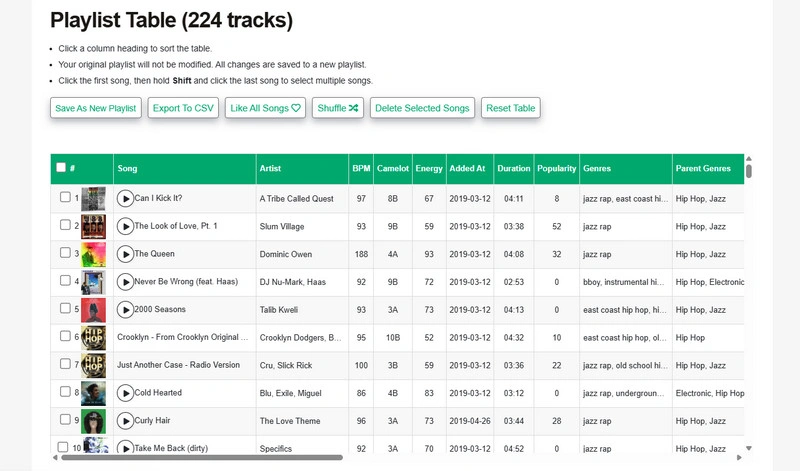
Chosic Spotify Playlist Sorter is an advanced, free online web tool that connects directly to your Spotify account to help you reorganize, filter, and sort your playlists using deep audio attributes and rich metadata.
| Website | https://www.chosic.com/spotify-playlist-sorter/ |
| ⭐Sort based on what⭐ | track name, artist, BPM, camelot, energy, added time, duration, popularity, genres, parent genres, album, album date, dance, acoustic, instrumental, valence, speech, live, loud (db), key, time signature, spotify track ID, label, SRC, explicit |
| Limits | Generally caps playlist loading/sorting at around 2,000 to 5,000 songs. You cannot directly edit or overwrite Spotify's official owned playlists. |
| OS | Web-only. |
| Special Feature: | 1. Chosic has a much longer attribute list (adds key, time signature, genre/sub-genre, instrumentalness, speechiness, liveness, plus bonus tools; 2. Users can output a playlist CSV. |
How to Use Chosic Spotify Playlist Web Organizer
Step 1 Head to www.chosic.com/spotify-playlist-sorter/.
Step 2 Click 'Login With Spotify', and your Spotify library will be synced.
Step 3 Choose a playlist from the list (you can even sort your playlist list itself for easier browsing — this doesn't affect Spotify).
Step 4 View the results table and click any column header to sort by that attribute.
Step 5 Save the new order back to Spotify, or use it to build a brand-new playlist from selected tracks.
❓ Want to Back Up All Your Organized Spotify Playlists?
NoteCable Spotify Music Converter
Compatible with Windows & macOS · 100% Safe & Clean
4. Organize Your Music
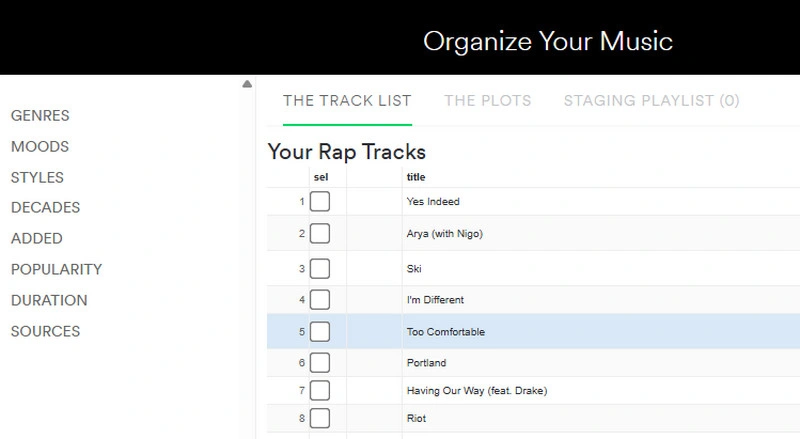
Designed as a sister tool to Sort Your Music, Organize Your Music is a free online browser app that helps you visualize and categorize your full music library, making it easy to discover patterns and build customized playlists.
| Website | https://organizeyourmusic.playlistmachinery.com/ |
| ⭐Sort based on what⭐ | genres, moods, styles, decades, added time, popularity, duration, playlist sources, year, dance, valence, speech, live, and loud. |
| Limits | Typically limits batch actions to 400 tracks at a time to prevent server overload. |
| OS | Web-only. |
| Special Feature: | 1. Pick any two audio properties (e.g., X-Axis: Energy, Y-Axis: Valence) to plot your entire music collection on a 2D graph, letting you visually spot outlier tracks; 2. Cherry-pick tracks from different bins, genres, or plot regions, gather them into a 'Staging Playlist', and export them as a brand-new Spotify playlist in one click. |
How to Use Organize Your Music
Step 1 Navigate to organizeyourmusic.playlistmachinery.com in your browser.
Step 2 Pick one of: Your Saved Music, songs you've added to a playlist, songs in playlists you follow, all of your music combined, or a specific playlist (by pasting its Spotify URI). Then, click 'Organize your Music'.
Step 3 On your first visit, you'll be prompted to authorize via Spotify's login. Depending on your Spotify library's size, importing your tracks might take a moment, but you can cancel the sync at any time to work with a partial list.
Step 4 After loading, your Spotify songs are categorized in the left sidebar by traits such as Genre, Mood, Decade, and Popularity.
Step 5 Click a category (e.g., a specific genre or decade). This filters the main view to just those Spotify tracks. From here, you can view the Spotify track list or switch to The Plots tab to see the same tracks as a scatter chart instead.
Step 6 Check the 'sel' checkbox next to any track, and selected Spotify tracks will automatically flow into your 'Staging Playlist'. Then, you can click 'Save' in the 'Staging Playlist'. This creates a brand-new playlist in your Spotify account.
5. TuneMyMusic Playlist Organizer
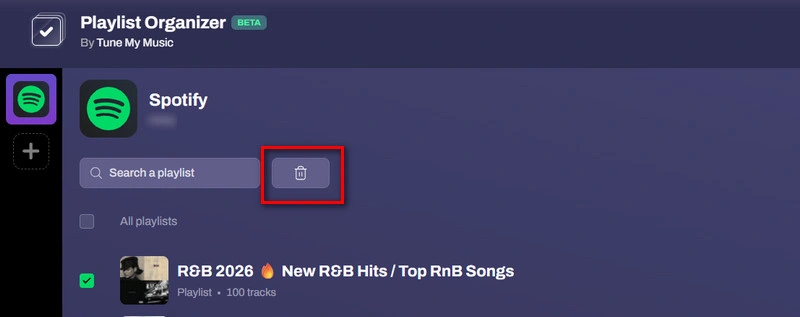
The TuneMyMusic Playlist Organizer is a web-based utility designed to bulk-manage entire playlists at once (mainly bulk deletion).
| Website | https://www.tunemymusic.com/features/playlist-organizer |
| Limits | The tool is designed for bulk deleting, unfollowing, and transferring playlists. It does not offer deep audio-attribute sorting (such as sorting tracks by BPM, energy, danceability, or key) like tools like Sort Your Music or Chosic do. |
| OS | Beta web-only currently. |
| Special Feature: | It works across Spotify, YouTube Music, Apple Music, Deezer, Tidal, Amazon Music, and other major services, not just Spotify. |
How to Use TuneMyMusic Playlist Organizer to Bulk-Manage Your Playlists
Step 1 Go to the Playlist Organizer page on tunemymusic.com.
Step 2 Choose your platform, such as Spotify or YouTube Music.
Step 3 Access your account so it can pull in your playlist library.
Step 4 Browse your playlist collection, and select the ones you want to remove. Then, click 'delete'.
6. Playlist Sorter
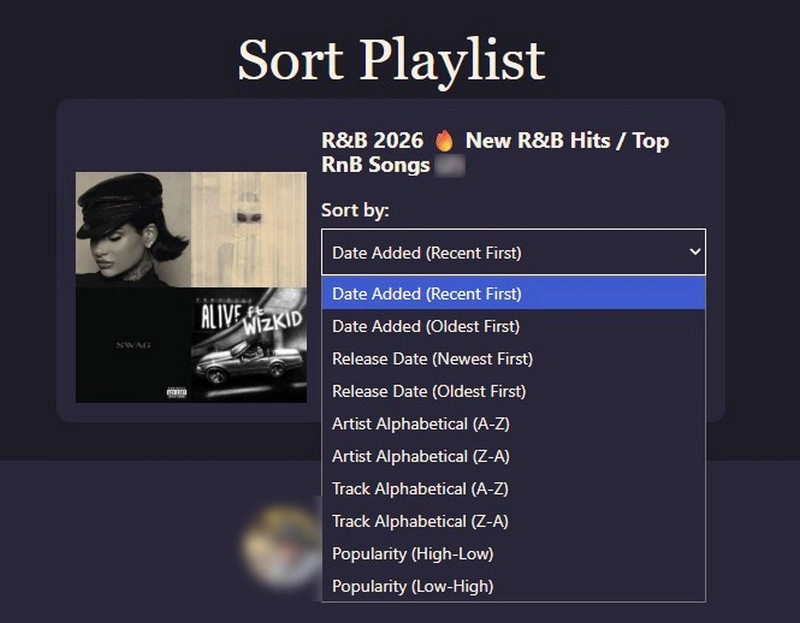
Playlist Sorter is a small, single-purpose, online tool that sorts Spotify playlists by release date, date added, artist, alphabetical order, and popularity.
| Website | https://www.playlistsorter.com/ |
| ⭐Sort based on what⭐ | release date, date added, artist, alphabetical order, and popularity. |
| Limits | It does not currently offer audio-feature filtering like BPM (tempo), danceability, valence (mood), or key signatures |
| OS | Web-only. |
| Special Feature: | The interface is clean and straightforward without any complex controls; just sign in, choose a playlist, apply a sort, and save your changes. |
How to Use Playlist Sorter to Organize Your Spotify Playlists
Step 1 Visit playlistsorter.com and click 'Connect with Spotify'.
Step 2 Choose the playlist you want to reorganize.
Step 3 Pick your preferred sorting parameter (e.g., Release Date, Popularity, Artist, etc.).
Step 4 Apply and save the changes back to your Spotify account.
7. Sortlee
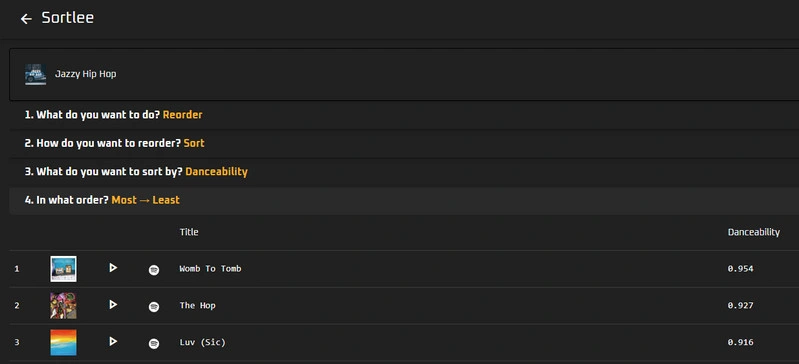
Sortlee is an online Spotify playlist manager and sorting utility designed to organize Spotify track lists using deep audio metadata, standard song information, and automatic backup protection.
| Website | https://www.sortlee.com/ |
| ⭐Sort based on what⭐ | Tempo/BPM, key, mode, time signature, volume, energy, danceability, Valence, instrumentalness, acousticness, live, title, artist, album, release date, duration, added date, and popularity. |
| Limits | 1. Free accounts are restricted to 1 playlist save per 24 hours; 2. There are ads in the description of new playlist. |
| OS | Web-only. |
| Special Feature: | Sortlee keeps a backup of your playlists so you can safely modify track order without losing the original sequence. |
How to Use Sortlee Spotify Playlist Organizer
Step 1 Visit sortlee.com.
Step 2 Click 'Start sorting', which takes you to a sign-in page where you connect your Spotify account.
Step 3 Choose one of your owned or followed playlists to sort.
Step 4 Then, choose a sorting method. It offers 19+ sorting options, from simple metadata to audio-analysis features like Tempo (BPM), Circle of 5ths/Camelot Wheel, Danceability, Energy, Popularity, Instrumentalness, and Emotional Tone.
Step 5 Preview before saving, and save the sorted order back to Spotify.
❓ How to Save All Your Organized Spotify Playlists?
NoteCable Spotify Music Converter
Compatible with Windows & macOS · 100% Safe & Clean
8. Emotionify
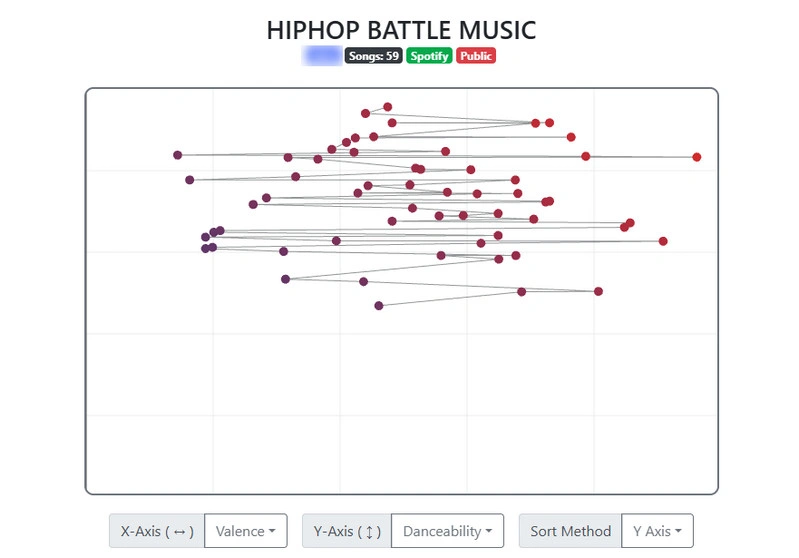
Emotionify is a free, open-source online Spotify playlist sorter designed to arrange your music by emotional flow. Instead of random track jumps, it uses Spotify audio data to create smooth, gradual mood transitions across your entire playlist.
| Website | https://emotionify.nitratine.net/ |
| ⭐Sort based on what⭐ | Acousticness, danceability, duration, energy, instrumentalness, liveness, loudness, speechiness, tempo, valence. |
| Limits | It relies on Spotify's automated audio-feature algorithms, which estimate a track's vibe numerically and may not always align 100% with personal emotional interpretation. |
| OS | Web-only. |
| Special Feature: | It visually plots every song on an interactive graph (Valence vs. Energy) so you can preview the 'flow' before saving. |
How to Use Emotionify Spotify Playlist Organizer
Step 1 Open the Emotionify website and log in with your Spotify account to grant it access to your playlists.
Step 2 Choose the playlist you want to reorganize.
Step 3 Pick a sorting method — group songs by mood, emotion, energy, danceability, or another available category.
Step 4 Review the new order or playlist layout Emotionify generates, and adjust it if it doesn't match what you're looking for.
Step 5 Approve the changes so Emotionify can save or update the playlist on your Spotify account, and open Spotify and listen to your newly arranged playlist, sorted to match the vibe you chose.
Best Match: NoteCable Spotify Music Converter
After organizing, if you also want to download your Spotify playlists for offline playback, you can use NoteCable Spotify Music Converter.
NoteCable Spotify Music Converter lets users save organized Spotify playlists, albums, and podcasts as local audio files in MP3, AAC, WAV, FLAC, AIFF, or ALAC formats. It preserves complete ID3 metadata, including title, artist, album, artwork, genre, track number, and year, to keep your music library well organized.
When downloading, NoteCable allows you to automatically organize and rearrange your output tracks by playlist, artist, album, or release year, keeping your local music folder as tidy as your Spotify library. With NoteCable, you can enjoy ad-free offline playback and transfer your downloaded music to MP3 players, USB drives, car systems, smartphones, and more.

NoteCable Spotify Downloader
- Download Spotify songs, playlists, podcasts, audiobooks, and music videos at 40x speed.
- One-Click Convert Spotify content to MP3, WAV, FLAC, AAC, AIFF, ALAC with ease.
- Download music videos and video podcasts, and save them as MP3 or MP4 files.
- Keep lossless audio quality, full ID3 tags, cover art, and lyrics intact.
- Works smoothly with both Spotify Free and Premium accounts.
Download Spotify music faster, keep full quality, and enjoy offline playback anytime.
How to Use NoteCable Spotify Music Converter
Step 1 Open NoteCable on your computer and log in to your Spotify account.
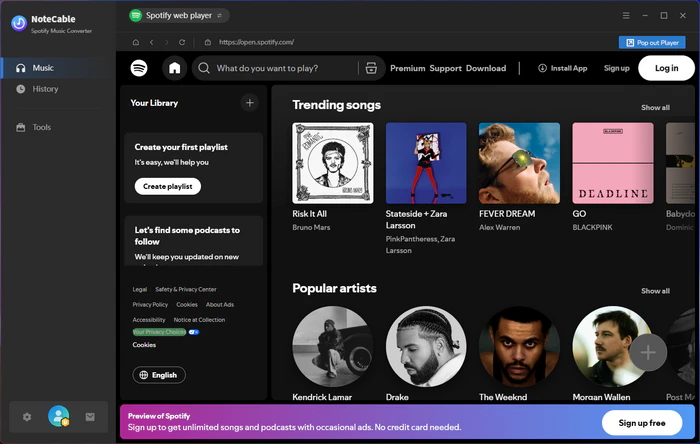
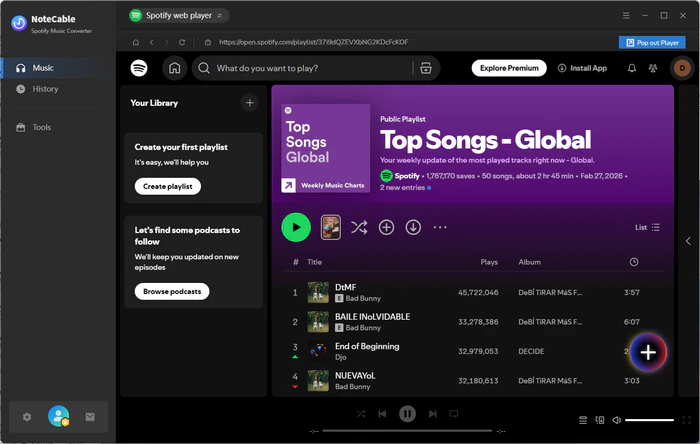
Step 2 Open your Liked Songs or find the playlists and tracks you want to download, then click the '+' button to add them.
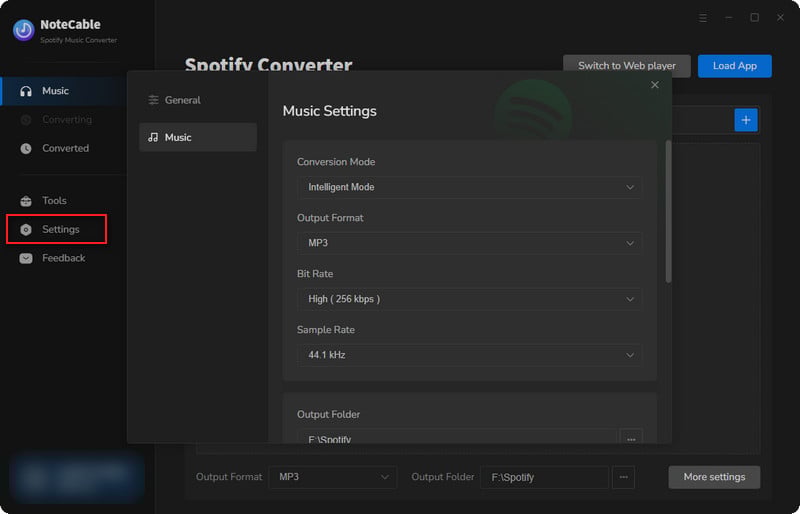
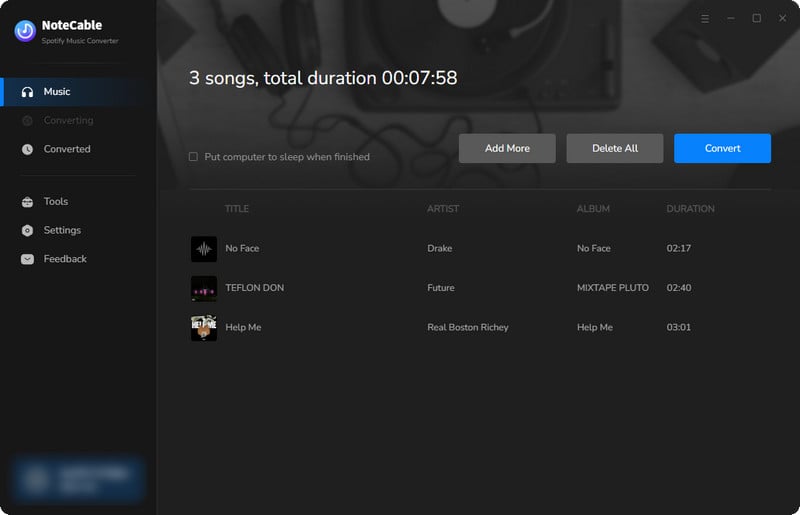
Step 3 Open 'Settings' to adjust your output preferences, including audio format, bit rate, sample rate, and target folder. You can also select how you want your Spotify playlist audio files organized—by playlist, artist, album, release year, or other categories.
Step 4 Click 'Convert' to begin downloading.
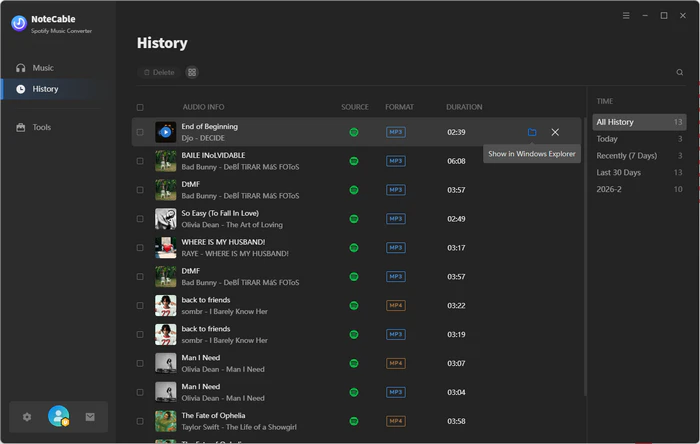
Step 5 Once completed, go to the 'History' tab to locate your saved audio files on your drive. If you want to share a few of these tracks, then just add the local audio to Sonikr Media Hub and share a playlist with friends via a temporary link.
FAQs About Free Online Spotify Playlist Organizers
Q1. How can I organize my playlists on Spotify?
A1. You can organize Spotify playlists by creating folders, renaming playlists, changing cover images, and manually rearranging songs. For large music libraries, you can also categorize tracks by mood, genre, artist, album, or activity.
Q2. Can I sort Spotify songs by artist, album, or release year?
A2. Spotify allows limited sorting options within playlists, such as sorting by title, artist, album, and date added. However, Spotify's built-in options lack advanced cross-filtering, such as sorting by release year combined with audio attributes (like BPM or mood). Third-party online free playlist organizers can help you reorganize Spotify tracks using more detailed rules.
Q3. How do I organize a Spotify playlist with hundreds of songs?
A3. Organizing massive playlists manually can take hours. Using a Spotify playlist organizer can make it easier to automatically sort and manage hundreds of tracks.
Q4. Are free online Spotify playlist organizers safe to use?
A4. Well-known tools are generally safe to use because they operate through Spotify's official framework. However, since they require account access, it is best to remain cautious and only authorize reputable Spotify playlist organizers.
Q5. How do I download my sorted Spotify playlists?
A5. Downloading your sorted Spotify playlists is easy with NoteCable Spotify Music Converter. The software keeps all essential ID3 metadata intact and lets you set custom file naming rules. Furthermore, you can arrange your music by album, artist, release year, or playlist structure prior to downloading for a clean local collection.
Q6. Will I lose my sorted playlist order if I download the tracks?
A6. Not if you use the right tool. Traditional recorders might scramble your files, but NoteCable Spotify Music Converter preserves exact track numbers and full ID3 metadata (title, artist, album, cover art), ensuring your carefully sorted playlist structure remains completely intact locally.
Conclusion
Organizing your Spotify library doesn't have to be a tedious task—using free online tools like Skiley, Chosic, or Emotionify makes it effortless to arrange your Spotify playlists by mood, BPM, release year, or genre. Once your Spotify collection is structured just the way you like it, we highly recommend using NoteCable Spotify Music Converter to download your sorted playlists as permanent local audio files with full Spotify ID3 metadata preserved, ensuring your Spotify music stays perfectly organized and accessible anytime, anywhere.

