


Home > Amazon Music Tips > Amazon Music to MP3 Converter
4 Best Amazon Music to MP3 Converters Tested in 2026: Desktop, Online, GitHub & More

Converting Amazon Music to MP3 has become a necessity for many users - whether for moving it to a USB drive or building their own music library. This article introduces 4 top Amazon Music to MP3 Converters to help you download MP3 from Amazon Music, including online tool, recorder, GitHub downloader, and desktop converter. Ultimately, you can choose the most suitable Amazon Music MP3 Converter based on your own needs.
1. NoteCable Amazon Music Converter
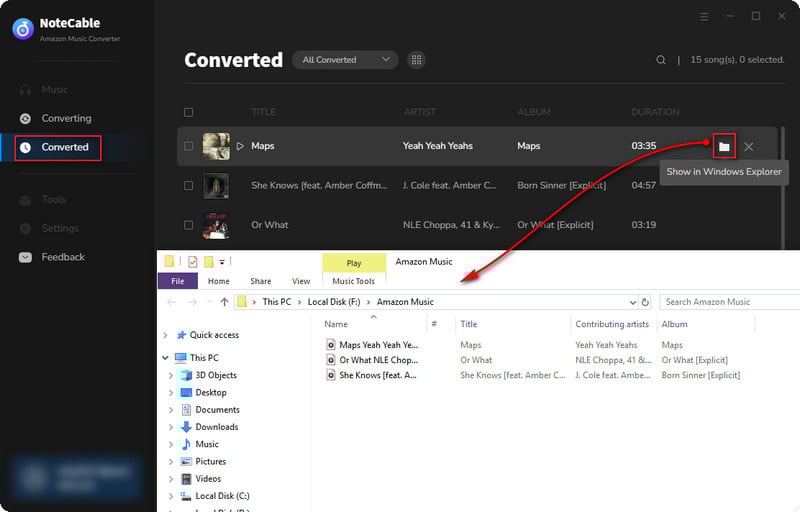
NoteCable Amazon Music Converter is currently one of the most stable Amazon Music to MP3 Converters. It can batch convert songs, playlists, albums, podcasts and even audiobooks under Amazon Prime and Unlimited accounts into formats such as MP3, FLAC, AAC, WAV, AIFF, and ALAC. During actual usage, it supports saving complete ID3 tags (including song names, artists, album covers, years, etc.).
For users seeking high audio quality, they can choose the App mode of NoteCable Amazon Music Converter, which supports output in Amazon Music HD/Ultra HD format (with a maximum bitrate of 3730kbps). For those who want a quick conversion from Amazon Music to MP3, they can choose the web mode, which offers a faster conversion speed (up to 10 times faster). However, the maximum output audio quality is 256kbps.
How to Convert Amazon Music to MP3?
Step 1 Launch NoteCable Amazon Music Converter, then select App mode or Web Player.
Step 2 Search for and open the music, album, or playlist within the Amazon Music library.
Step 3 Click the "+" button in the bottom-right corner, then select the music you want to download to add it to the processing queue.
Step 4 Open the Settings window and select MP3 as the output audio format.
Step 5 Click the "Convert" button to start downloading MP3s from Amazon Music.
2. Lucida.to
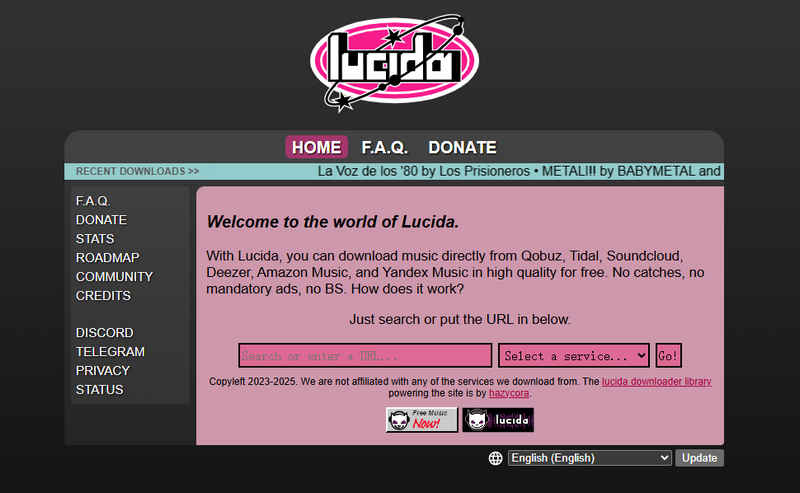
Lucida.to is a free online Amazon Music downloader that allows you to parse and download tracks as MP3s simply by pasting a link. Based on actual tests, Lucida.to performs relatively stably when processing short playlist tasks. A playlist containing 10 songs takes approximately 4 minutes and 30 seconds to complete, with an average of about 27 seconds per song. After the task is completed, the converted files will be automatically packaged into a ZIP file and downloaded to the local device without any additional operations.
However, its stability decreases when dealing with larger playlists. When testing a playlist containing 31 songs, the conversion process stopped after the failure of the 8th song, and it was unable to continue automatically processing the subsequent songs. Users need to manually skip the failed songs or directly download the completed part of the files. This indicates that Lucida.to still has certain limitations in large-scale tasks and is more suitable for handling single songs and small playlists.
How to Download MP3 from Amazon Music?
Step 1 Open the Amazon Music web player and copy the link to the song or playlist you want to download.
Step 2 Paste the link into Lucida.to and click the "Go" button.
Step 3 Select your preferred output settings.
Step 4 Click the "Download full album" button or the download button next to each individual track.
 If you need a solution for converting songs, albums or playlists from any streaming platforms (such as Spotify, Apple Music, Tidal, Amazon Music, Deezer, YouTube, YouTube Music, SoundCloud, DailyMotion, and more) to MP3 format, All-In-One Music Converter is the perfect choice.
3. Antra
Antra is an open-source, multi-platform tool on Github for music downloading and local library management. It offers both a web interface for quick downloads and a desktop application for users who require more comprehensive library management capabilities.
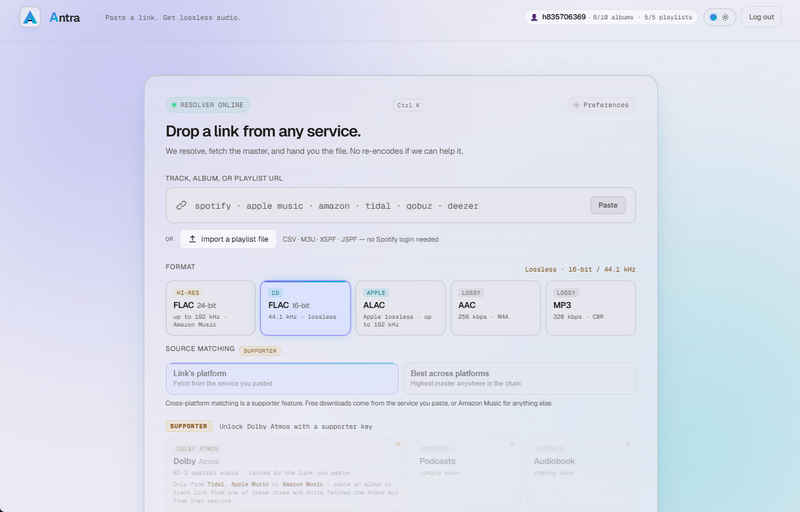
Although Antra claims to be open-source and requires no complex configuration, in actual usage, the first launch still requires registration and login of an Antra account. Additionally, the free account has certain usage restrictions, including a maximum of 100 single songs (10 albums, 5 playlists) per day.
It should be noted that during the testing process, when we obtained the installation file through the download link provided by the official GitHub repository, we encountered a security interception prompt from the Chrome browser, marking the file as a suspicious download. Therefore, users should confirm the source of the file before installation and make a judgment based on their own security settings.
How to Convert Amazon Music to MP3 with Antra?
Step 1 Copy the share link for the target song or playlist from Amazon Music.
Step 2 On the Antra online version, simply click the "Paste" button and it will automatically add the link.
Step 3 Select the MP3 format and click the download button to begin converting Amazon Music to MP3.
4. Audacity
Audacity is a free and open-source audio editing software that is compatible with Windows, macOS and Linux. Unlike recording via a microphone, Audacity uses the WASAPI loopback feature to capture Amazon Music audio streams directly from Windows playback, thereby avoiding external noise and the sound quality degradation that occurs when sound travels from speakers to a microphone.
However, the final MP3 quality is still limited by the original Amazon Music stream and the MP3 encoding settings. Since MP3 is a lossy format, exporting the recording as MP3 may introduce additional compression compared with the original playback source.
How to Record Amazon Music MP3 with Audacity on Windows?
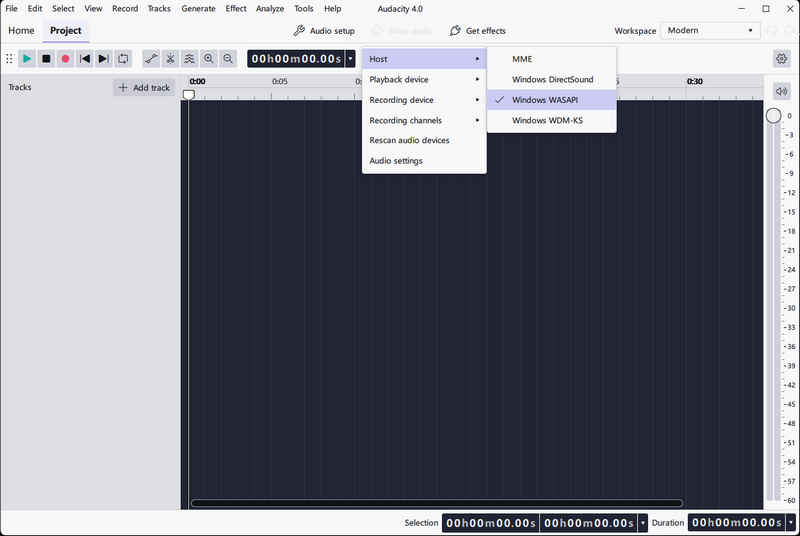
Step 1 Open Audacity and set the Host under the "Audio setup" menu to "Windows WASAPI".
Step 2 Select the speaker device with the "loopback" suffix as the Recording Device.
Step 3 Start playing the target song in Amazon Music first (WASAPI requires a signal to initialize).
Step 4 Click the Record button in Audacity, and stop recording once the song finishes playing.
Step 5 Go to File > Export Audio, select MP3 as the output format, and save the file to your computer.
FAQ About Amazon Music to MP3 Converter
Can I rip music from Amazon Music?
The downloaded audio from Amazon Music is encrypted by DRM and can only be played within the official App. It cannot be copied or exported. The only exception is the songs you purchase individually - the digital music sold in the Amazon store is DRM-free MP3, which can be permanently saved and played freely.
How can I convert Amazon Music to MP3 for free?
You can use the free Audacity tool to record the playback content of Amazon Music, or use the online tool Lucida.to or the open-source conversion tools on GitHub to convert it for free. However, the free solutions often have some limitations, such as the need for real-time recording or unstable services.
NoteCable Amazon Music Converter is a more stable and convenient tool for users who frequently switch between Amazon Music songs, albums or playlists. It supports batch conversion, retains metadata, offers multiple output formats, and has a faster processing speed.
Can Telegram bots convert Amazon Music to MP3?
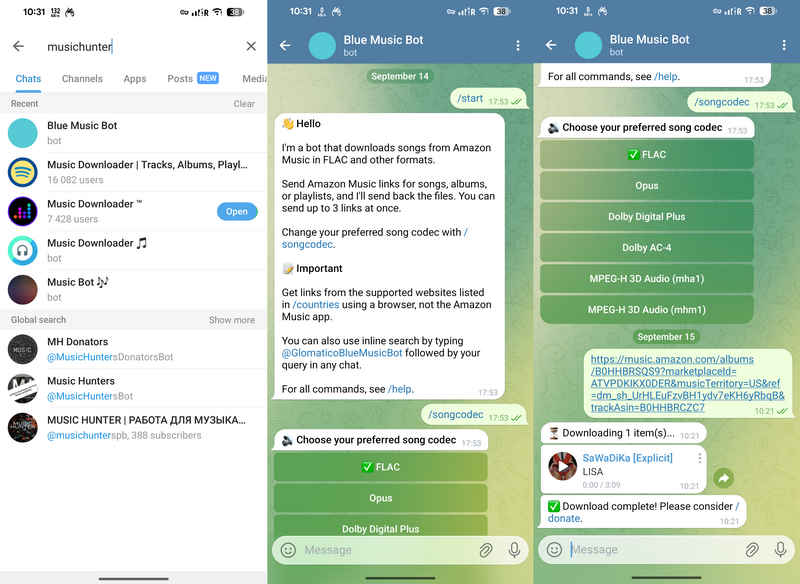
No. Our testing shows that the vast majority of Telegram bots are unable to parse Amazon Music tracks. Furthermore, while the most popular bot we tested, @GlomaticoBlueMusicBot, can process Amazon Music links and provide downloadable audio files, it outputs them in FLAC format rather than MP3.
End Words
Free Amazon Music Converters like Lucida.to, Antra and Audacity might be suitable for a small number of songs, but for users managing large music libraries, using the professional NoteCable Amazon Music Converter would be more reliable. With 10 times batch acceleration and complete ID3 tag retention functionality, it has become the smoothest and most efficient solution when dealing with large playlists and albums.

You may also need: NoteCable Spotify Music Converter
NoteCable Spotify Music Converter is a fantastic tool for converting Spotify music from a special OGG Vorbis format into a common format like MP3, AAC, WAV, FLAC, ALAC, or AIFF. Learn more >>


 Amazon Music Converter
 iTunes Music Converter
 Tidal Music Converter
 Deezer Music Converter
 YouTube Music Converter
 Any Music Recorder
 Music Playlist Transfer
